
Wednesday, October 24, 2018

Sunday, October 21, 2018
DOWNLOAD AND ENJOY CD SHOP MANAGEMENT SOFTWARE (MMCD v3.1)
Download Mfumo wa mauzo ya Duka la CD
..............................HALOOO..............................................
Karibu katika mfumo wa uuzaji wacd pamoja na muziki kwa wateja
Huu mfumo umetengenezwa na
Karoli Alex
0745 893 292
mfumo unahitaji mambo yafuatavyo:-
1. uwe na Runtime 2007
2. Antvirus
3. Nafasi ya RAM <500MB
4.Hard Disk 4gb/Zaidi
Zingatia:
1. mtu kutumia asiyejua kutumia
2. hifadhi password za kila lockuot
3. Usimpe mtu yeyote password ambayo inakuhusu
Msaada Piga:
0745 893 292
0767 574 013
Au Fika MULLER COMPUTER SOFTWARE maduka ya sirari karibu na New Khachan na New Kamani
Asante Sana
......Karibu........
Saturday, October 20, 2018
Thursday, October 11, 2018
Thursday, September 6, 2018
Fix: Windows Setup could not configure Windows to run on this computer hardware
There are quite a few error codes which will definitely annoy every user. However, this one differs from the rest as it won’t allow you to even install Windows on your computer in the first place, as can be understood from the error message.
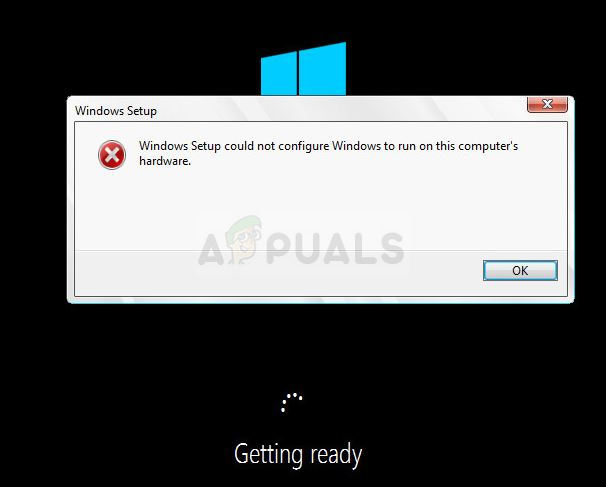
The error usually appears when trying to run Windows Setup and the process simply stops with the message above. This is a clear sign that something is wrong on your computer, especially if you own a PC which can support the version of Windows you are trying to install. Follow the steps below to try and solve the problem easily.
Solution 1: A Command Prompt Tweak
This tweak has proven itself useful to countless users who struggled with this error message for months and it’s amazing how the solution can turn out to be so easy yet so difficult to think off. The solution should be executed the first time you see the error when only starting the installation of Windows and you should be able to go through the installation process successfully.
- Once you receive the error message on your PC while the Windows installation media is still connected to your computer, use the Shift + F10 key combination in order to bring up a Command Prompt window.
- Type in the following commands and make sure you click Enter after each one:
CD C:\windows\system32\oobe
msoobe
msoobe
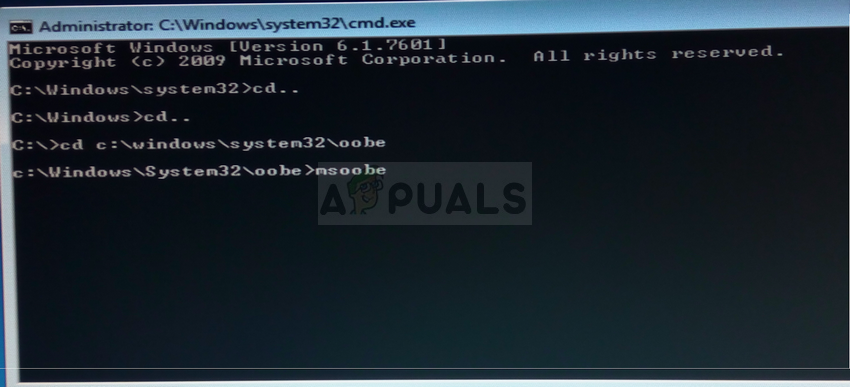
- Check to see if you are able to continue with the process once again.
Solution 2: Change Some BIOS Settings
There are several caused for this problem, but one of them is definitely the fact that there are certain settings in BIOS which works great for older versions of the Windows operating system but they display poor execution on Windows 10 and it can often cause this error to occur. Follow the steps below in order to fix this.
- Turn off your computer by going to the Start Menu >> Power Button >> Shut down.
- Turn your PC on again and try to enter BIOS settigns by pressing the BIOS key while the system starts. The BIOS key is typically displayed on the boot screen, saying “Press ___ to enter Setup.” There are other common messages as wel. Common BIOS keys are F1, F2, Del, Esc and F10. Note that you will have to be quick about this as the message disappears pretty fast meaning you will need to restart to try again.
Saturday, August 18, 2018
WINDOW LOADER

Windows
Loader v2.1.7 is supported with the following operating systems:
Windows
7 Ultimate
Windows
7 Ultimate E
Windows
7 Professional
Windows
7 Professional E
Windows
7 Home Premium
Windows
7 Home Premium E
Windows
7 Home Basic
Windows
7 Starter
Windows
7 Starter E
Windows
Vista Ultimate
Windows
Vista Business
Windows
Vista Business N
Windows
Vista Home Premium
Windows
Vista Home Basic
Windows
Vista Home Basic N
Windows
Vista Starter
Windows
Server 2008 Enterprise
Windows
Server 2008 Foundation
Windows
Server 2008 Standard
Windows
Small Business Server 2008
Windows
Storage Server 2008 Standard
Windows
Server 2008 R2 Enterprise
Windows
Server 2008 R2 Foundation
Windows
Server 2008 R2 Standard
Windows
Small Business Server 2011 Standard
Friday, July 13, 2018
DOWNLOAD FREE ONE YEAR ANTVIRUS FOR ALL PC II Download free 360 days antivirus trial now.

KasperskyAnti-VirusFree one 360(days) year Antivirus
DOWNLOAD YOUR KASPERSKY ANTI-VIRUS FREE TRIAL
During your FREE 360 Days , you’ll discover how Kaspersky Anti-Virus gives you a smarter way to protect everything on your PC:
- Defending against viruses, ransomware, spyware & more
- Protecting you… without slowing you down
- Simplifying your security – with online control
Download free 360 days antivirus trial now.

Subscribe to:
Comments (Atom)